How to Copy Text from an Image in Finder on Mac
A screenshot of an error, a photo of a receipt, a scanned page: the text is right there, but you can't select it. With SaneClick you right-click the image in Finder and copy its text without opening it. Text recognition runs on your Mac with Apple's Vision framework, so nothing is uploaded.
Built in: Live Text in Preview
Free, one image at a time.
- 1Open the image in Preview.
- 2Drag across the text, Control-click it and choose Copy Text.
From Finder: SaneClick
Right-click one image or many, without opening them.
- ✓Copy Text from Image: puts the text on your clipboard.
- ✓Save Text from Image: writes a .txt file next to each image.
- ✓On your Mac: no upload and no internet needed.
Turn the actions on once
- 1Open SaneClick and click Browse Library.
- 2Open Images & Media (or type “Text from Image” in Search scripts...).
- 3Switch on Copy Text from Image, and Save Text from Image if you want text files too.
Copy the text
- 1In Finder, Control-click (or right-click) an image. Select several first to do them all at once.
- 2Choose Images & Media > Copy Text from Image.
- 3Paste the text anywhere with Command-V.
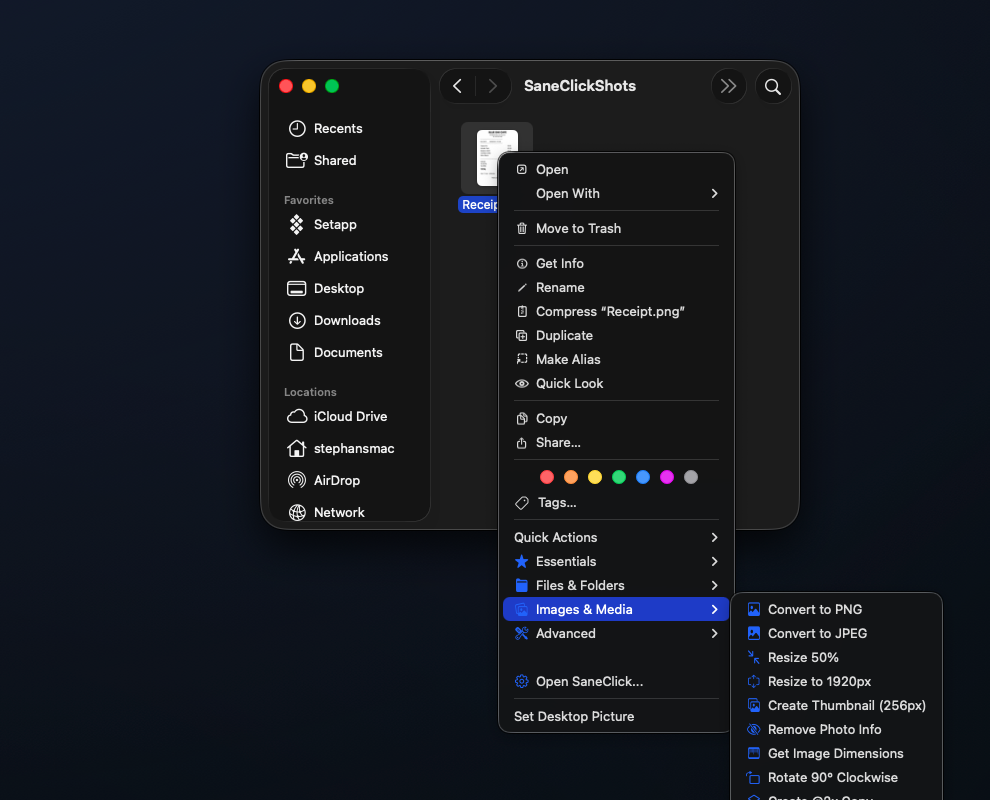
With several images, SaneClick reads them in file-name order and joins the text into one block. Save Text from Image instead writes a .txt file beside each image with the same name, such as receipt.txt next to receipt.png. It never replaces an existing file, and images with no text get no file.
Supported images
The actions appear for JPG, JPEG, PNG, HEIC, TIFF, GIF, BMP and WebP files.
What it can't do
- •PDFs: a PDF is not an image, so the actions don't appear for it.
- •Animations and multi-page files: only the first frame of an animated GIF or the first page of a TIFF is read.
- •Messy text: there is no language setting. Clear printed text works best; handwriting, tiny print and some languages may come out wrong.
- •No text found: your clipboard stays as it was.
Don't see the folders? Open SaneClick Settings > General. The status should read Extension Active; if not, click Manage Finder Extension. If the menu is missing in one folder, add it under Monitored Folders.
Get SaneClick
Both text actions are in the download from saneclick.com, with every feature free for 14 days and no credit card. After that it's $14.99 once. In the Mac App Store version, text recognition comes with the SaneClick Pro Access in-app purchase. Needs macOS 14 or later on Apple silicon.
Questions
Does SaneClick upload my images?
No. Copy Text from Image uses Apple's Vision framework on your Mac. It works without an internet connection.
Can I copy text from several images at once?
Yes. Select them all, then choose Copy Text from Image. SaneClick reads them in file-name order and puts all the text on the clipboard together.
Where does Save Text from Image put the text?
In a .txt file next to each image, with the same name, such as receipt.txt beside receipt.png. If that name is taken, it picks a new name instead of replacing the file.