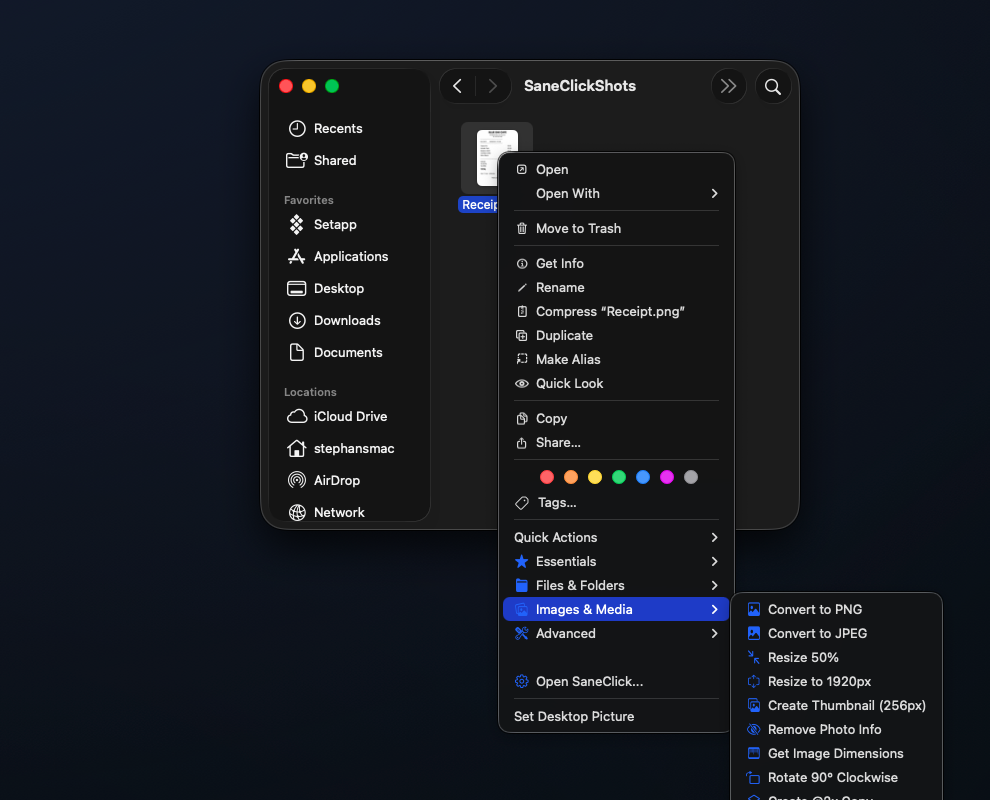
Real Finder actions.
Real file workflows.
Copy paths, resize images, organize folders,
and run useful Mac actions without leaving Finder.
Copy text out of any image, convert HEIC, turn images into PDFs, resize, rename, run scripts. 62 Finder actions, all 100% on your Mac. No cloud. No subscription. Pay once.
Everything is included for 14 days. No credit card required. Buy once after the trial.
Requires macOS 14 or later on an Apple silicon Mac.
Buy SaneClick now — $14.99 onceThe short demo — real right-click menu on screen, no mockups.
Free for 14 days
$0
Then $14.99 once to keep using SaneClick. No subscription.
Buying more than one SaneApps Mac app?
Get the Everything Bundle for $34.99 once. SaneClip, SaneClick and SaneHosts in one purchase.
Get the bundle See included apps →Real capture, no mockups
Right-click → Essentials → Duplicate with Timestamp — straight from Finder.
Sold? Start the 14-day trial — no credit card required.
Copy paths, resize images, organize folders,
and run useful Mac actions without leaving Finder.
This is not a toy script runner. It is a practical Finder toolkit for everyday file work, creative assets, and developer workflows.
Use the right-click menu you already trust to copy paths, open Terminal, duplicate files with timestamps, and clear repetitive Finder busywork.
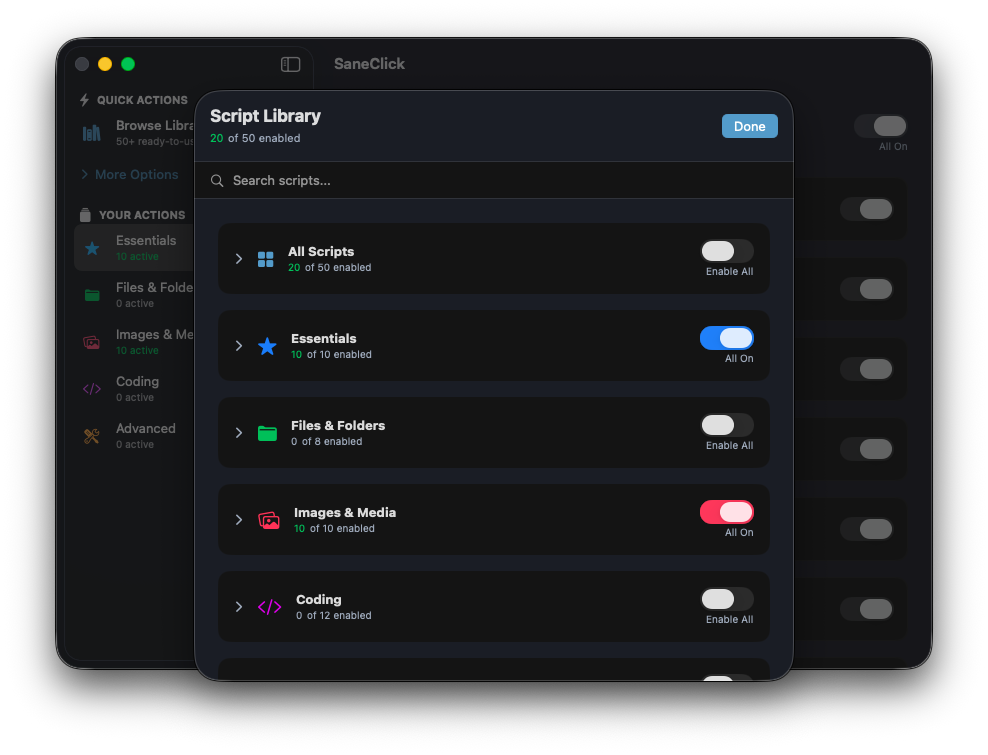
Pull the text out of any screenshot or scan, turn HEIC into JPG by the folder, and combine images into a PDF without opening another app, or uploading anything anywhere. It all runs on your Mac.
Guides: copy text from an image · convert HEIC to JPEG · remove photo location data
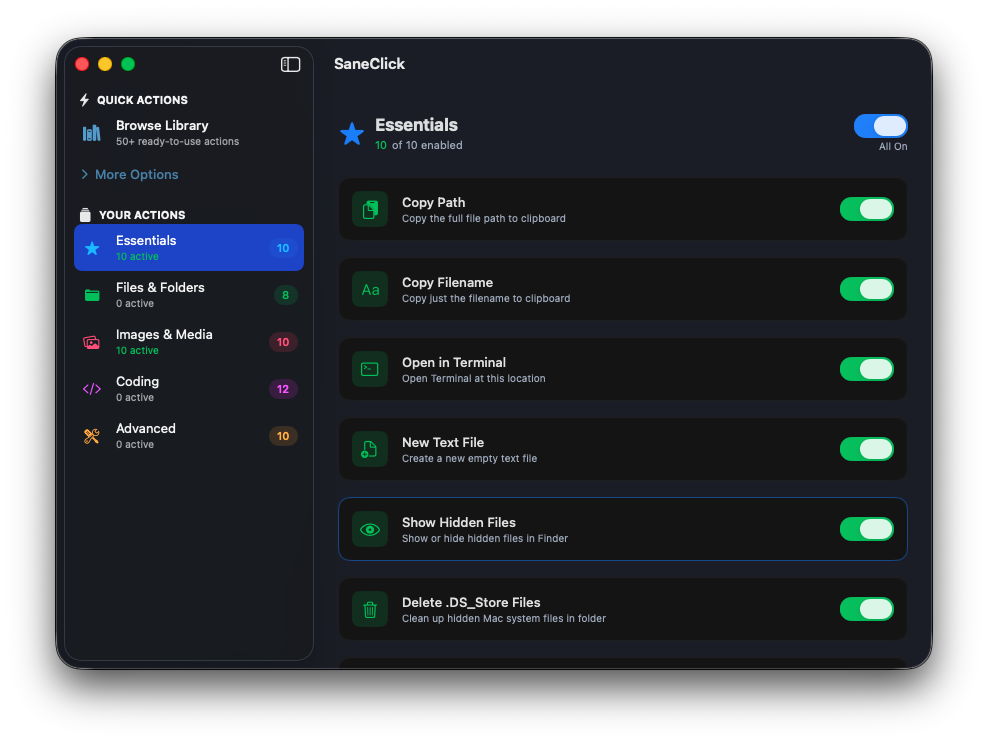
Use the deeper toolkit when you need it: dev utilities, custom scripts, test-before-save, and import/export for a setup you can actually grow.
Guides: add your own scripts · open files in VS Code
Why fight with Automator when you can just right-click?
This table reflects SaneClick. The download includes everything for 14 days, then requires a one-time purchase.
| Feature | SaneClick | Automator | Shortcuts |
|---|---|---|---|
| Setup Speed | Instant | Very Slow | Slow |
| 62 Built-in Actions | ✓ | ✗ | ✗ |
| 5 Action Categories | ✓ | ✗ | ✗ |
| Image & Media Workflows | ✓ | Limited | Limited |
| Coding Workflows | ✓ | Hidden | Hidden |
| Smart File Filtering | ✓ | Limited | Limited |
| Custom Script Editor | ✓ | Complex | Limited |
| Test Before Save | ✓ | ✗ | ✗ |
| Import / Export Library | ✓ | ✗ | ✗ |
| Privacy (Local Only) | ✓ | ✓ | ✓ |
| Price | $14.99 once | Free | Free |
Only SaneClick does all of it, and it's the only one whose page lists copying text out of an image.
| Feature | SaneClick | iBoysoft MagicMenu | Service Station | FilePane |
|---|---|---|---|---|
| Copy text from image (OCR) | ✓ | — | — | — |
| Images to PDF and back | ✓ | — | — | ✓ |
| Convert images | ✓ | ✓ | — | ✓ |
| 100% Transparent Code | ✓ | ✗ | — | ✗ |
| One-time price | ✓ | ✓ | ✓ | ✓ |
| Price | $14.99 once | $19.95/yr or $59.95 once | $14.99 once | $6.99 once |
Checked on each company's own page on 12 Nov 2026 (MagicMenu prices on 17 Oct 2026): iBoysoft MagicMenu, Service Station, FilePane. “—” means the company doesn't publicly state it. SaneClick can also split a PDF into pages.
Tip: Import opens a small window where you choose the JSON file. It keeps the flow fast and reliable.
The download from saneclick.com includes every feature free for 14 days, with no credit card. After the trial it's $14.99 once. There's no subscription. SaneClick is also part of the SaneApps Everything Bundle ($34.99 once).
Not quite. The Mac App Store version is free with 13 built-in Finder actions, and the SaneClick Pro Access in-app purchase ($9.99) adds 24 more, including text recognition, PDF tools, image conversion and resizing, batch rename and file hashing. The download from saneclick.com includes all 62 actions and the custom script editor.
SaneClick needs macOS 14 Sonoma or later on an Apple silicon Mac. It doesn't run on Intel Macs.
Open SaneClick and turn on its Finder extension in System Settings > Privacy & Security > Extensions > Added Extensions > Finder. The Manage Finder Extension button in SaneClick's settings takes you there. Then open Browse Library, switch on the actions you want, and use Manage Folders to choose where they appear in Finder.
Check Settings > General in SaneClick. Green means the extension is active. Orange means Finder needs a restart, which the Restart Finder button does for you. Red means the extension is turned off in System Settings. Actions also appear only in the folders you chose and only for file types they work on.
Yes, in the version from saneclick.com. Choose Write Custom Action, pick Bash, AppleScript or Automator, set which files it applies to, and use Test to run a Bash or AppleScript action on real files and preview the output before you save. You can import and export your actions as JSON.
No. Your files and script contents stay on your Mac and aren't sent to SaneApps. The app goes online only to check for updates, validate a license key, and send aggregate counts such as app version, which never include your files.
"For God has not given us a spirit of fear, but of power and of love and of a sound mind." — 2 Timothy 1:7
Execute complex scripts with one click. No Terminal required.
Designed to be useful, not to extract data. Your privacy is the priority.
Clean up your workflow. Focus on the task, not the tool.
Download starts a 14-day trial. After the trial, buy once to keep using SaneClick.
I build apps because I love building things that work well.
If SaneClick saves you time, consider supporting development.
Thank you. — Mr. Sane
Simple Mac utilities that respect your time and privacy.
Prefer privacy-first payments? Send $14.99 in any of these:

3Go9nJu3dj2qaa4EAYXrTsTf5AnhcrPQke

0x026668feA51c27F0803055B8c0d881ac2F1e7C3e

FBvU83GUmwEYk3HMwZh3GBorGvrVVWSPb8VLCKeLiWZZ

t1PaQ7LSoRDVvXLaQTWmy5tKUAiKxuE9hBN
Click any address to copy
I verify the transaction, then I reply with your SaneClick license key. If I miss your email, follow up and I will fix it.